I need to run a program as Administrator programmatically.
Fortunately googling this was so easy. Found this one:
Run Program As Administrator in vb.net
Open the Project Properties then click on View Windows Setting button. It will open the app.manifest file.
I learned many thing but forgets many things too. Writing a simple blog as a journal is a good start to keep what I've learned.
I'm using Microsoft Visual Studio with Visual Basic as my language.
Showing posts with label visual studio 2015. Show all posts
Tuesday, May 24, 2016
Using Squirrel to replace ClickOnce
Installing Squirrel
While I was searching for a way to make ClickOnce deploy easier after all hardship about certificate and identity errors, I bump into Squirrel.Windows. Thanks to Travis's comment in this question: Deploy a ClickOnce application without signing. Even though no one answer that was Marked ans Answer (yet at the time), the comments really help to give me an idea about some alternatives.
I create a new project that target a .Net Framework 3.5 and start searching for it in the Manage Nuget Packages for Solution.Current latest stable version is 1.4.0. I install it right away.
Create a new Nuget Package for my Visual Studio Application
To create a new Nuget Package, I must install the Nuget Package Explorer. If uses Internet Explorer, it will run immediately to install if click the Download button.
This is when I run it:
1. I just have to create a new package (Ctrl+N).
This is when I run it:
1. I just have to create a new package (Ctrl+N).
Sunday, May 22, 2016
Success: Compiling LESS into CSS with Visual Studio 2015 via Web Compiler.
From the last time, I got disappointed for not successful in trying to produce a CSS file from a LESS using Web Compiler.
Reference: Attempt Compiling LESS into CSS with Visual Studio 2015 via Web Compiler.
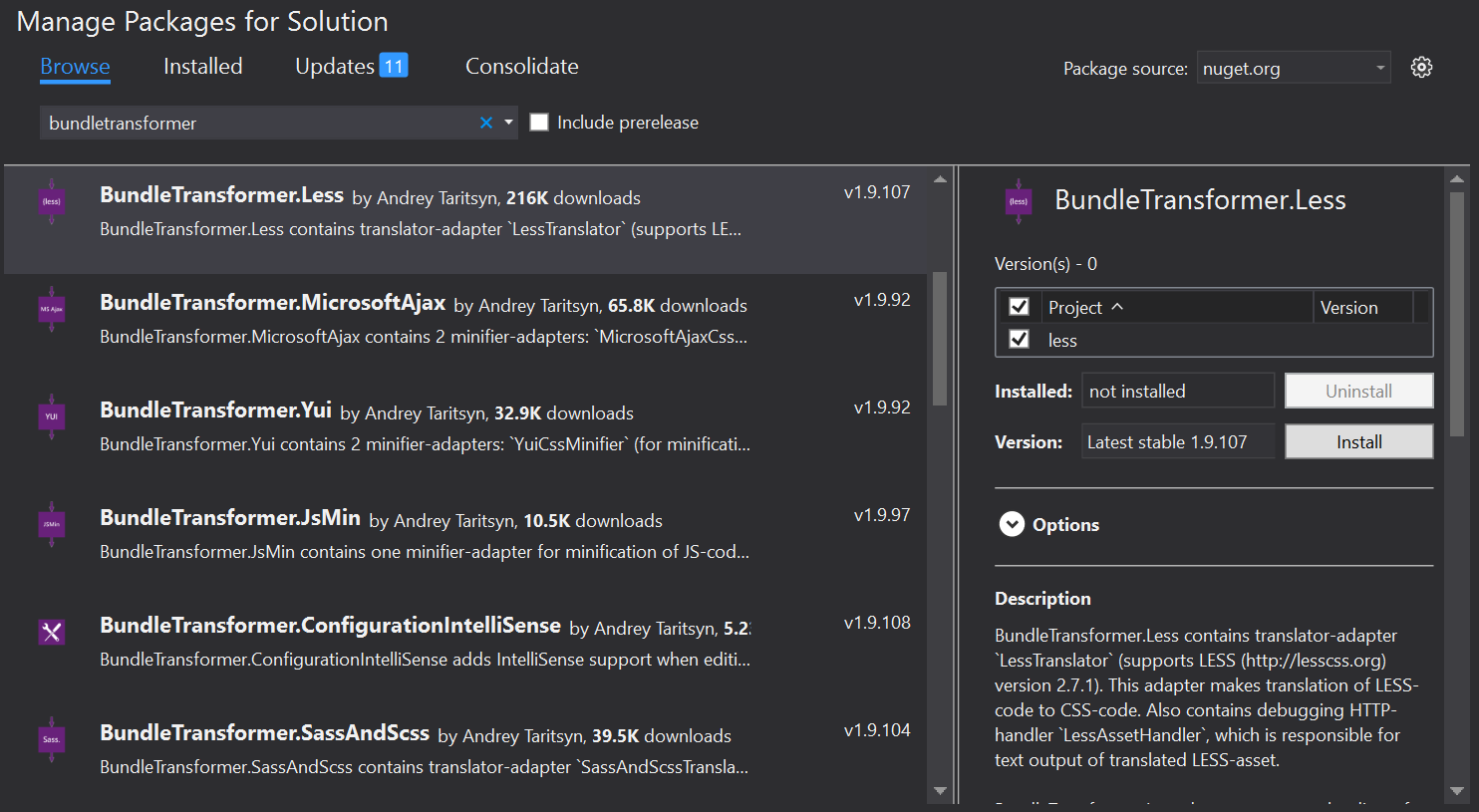
I also tried the Bundle Transformer: LESS. but misunderstood that its a translator, not a compiler.
But this morning, after turning on my laptop, I open my last project. I try to re-compile my LESS file, of course using the Web Compiler. So strange because it works. It even generates the minified css.
Whats happening? I remember that I had restarted the Visual Studio many times. Do I have to restart my laptop? Is that it? I should think about that sooner. Wasted my precious hours on nothing. Arrgh.
By the way, I'm happy that it works. The usage is so easy.
ps: today I learned a very valuable lesson - restart my PC fist if any problem occur.
Attempt Compiling LESS into CSS with Visual Studio 2015 via Bundle Transformer: LESS
From the last time, I got disappointed for not successfull in trying to generate a CSS file from a LESS file using Web Compiler.
Reference: Attempt Compiling LESS into CSS with Visual Studio 2015 via Web Compiler.
Now I want to try the Bundle Transformer: LESS. Wish me luck.
I can install it from "Manage Nuget Packages for Solution.." in the Nuget Package Manager.
Attempt Compiling LESS into CSS with Visual Studio 2015 via Web Compiler.
So far, I only write CSS for my website presentation. But I heard that VS2015 can compile LESS to CSS and minify it. But I heard wrong. The feature is never in VS2015 but in the previous version that is in the VS2013. That is disappointing.
So I try searching for any extension on the net. Bumped to this in the VisualStudioGallery called Web Compiler. I decided to download and install it.
Then I just have to right-click on the LESS file (in Solution Explorer) and choose compile (right?).

So I try searching for any extension on the net. Bumped to this in the VisualStudioGallery called Web Compiler. I decided to download and install it.
Then I just have to right-click on the LESS file (in Solution Explorer) and choose compile (right?).
Saturday, May 21, 2016
Conditional Compilation
Today I learn that I can do Conditional Compiling on VB.Net,
In conditional compilation, particular blocks of code in a program are compiled selectively while others are ignored.
Reference: Conditional Compilation in Visual Basic
For example if I Write this code in the form Load event:
This is really handy.
In conditional compilation, particular blocks of code in a program are compiled selectively while others are ignored.
Reference: Conditional Compilation in Visual Basic
For example if I Write this code in the form Load event:
When I build in DEBUG mode, the "MsgBox("This is DEBUG build")" and when I build in RELEASE mode or any other custom mode, the "MsgBox("This is not a DEBUG build")" will be triggered.Private Sub frmStarter_Load(sender As Object, e As EventArgs) Handles Me.Load #If DEBUG Then MsgBox("This is DEBUG build") #Else MsgBox("This is not a DEBUG build") #End IfEnd Sub
This is really handy.
Tuesday, May 17, 2016
OLEDB error. "Operation must use an updatable query."
At one time I published a web project that used OLEDB to connect to Ms Access and update some data I got an error "Operation must use an updatable query."
Some googling reached me on this site: “Operation must use an updateable query” error in MS Access
The chosen as answer doesn't really solve my problem. but the second answer really solve it.
The Answer:
Some googling reached me on this site: “Operation must use an updateable query” error in MS Access
The chosen as answer doesn't really solve my problem. but the second answer really solve it.
The Answer:
There is no error in the code, but the error is thrown due to the following:
- Please check whether you have given Read-write permission to MS-Access database file.
- The Database file where it is stored (say in Folder1) is read-only..?
suppose you are stored the database (MS-Access file) in read only folder, while running your application the connection is not force-fully opened. Hence change the file permission / its containing folder permission like in
C:\Program files all most all c drive files been set read-only so changing this permission solves this Problem.
So I change the permission on my folder (App_Data) that stored my Ms Access database to full control.
Problem solved.
Monday, May 16, 2016
Problem with "Application identity is not set". (solved?)
Today I got a problem when I test my application. I commonly build my application then run it from the "debug" or "release" folder in my VirtualBox.
After some googling, I learn that the cause of the problem comes from this code:
lblVersion.text = Deployment.Application.ApplicationDeployment.CurrentDeployment.CurrentVersion.ToString
Reference: How to show program version in your form?Sunday, May 15, 2016
Include the project2.exe.config info in a reference executable in .NET?
I have a problem in a referenced project where the project2.exe.config file for a referenced project in not included in the project. Every time I must copy the project2.exe.config file into my project manually to make it works.
Tried googling and found this:
Reference: How to include the App.config info in a reference executable in .NET?
Tried googling and found this:
I have one executable project, let's say A, which is launching another executable project Bin the run. In order to have a B.exe in A's current working folder, I add B as A's reference so that after the compilation a B.exe will be copied into A's folder. However, I noticed the configuration that I make for B is not copied or generated in A's folder (there is no B.exe.config file in A's folder, only B.exe), and hence the stuff such as tracing for B is not configured correctly.
I can of course copy the B.exe.config manually to A's folder, but I bet there is some automatic way to do that. Could anybody help me?
Reference: How to include the App.config info in a reference executable in .NET?
Subscribe to:
Posts (Atom)