Tuesday, May 24, 2016

Create a new Nuget Package for my Visual Studio Application

To create a new Nuget Package, I must install the Nuget Package Explorer. If uses Internet Explorer, it will run immediately to install if click the Download button.

This is when I run it:


1. I just have to create a new package (Ctrl+N).

Monday, May 23, 2016

Trouble renaming IIS Website.

I have a web server. IIS on Windows Server 2008 R2. It'a a production server which runs many applications for my company.


Every time I open the IIS Manager I can see that "Defaults" as the name of my website. It really itch my eyes for month. But today I decided to change the name to something else.I think about name it the same as the domain name. So I try right-clicking the "Defaults". Owh, there's a "rename". Maybe I should try it.

Sunday, May 22, 2016

Success: Compiling LESS into CSS with Visual Studio 2015 via Web Compiler.

From the last time, I got disappointed for not successful in trying to produce a CSS file from a LESS using Web Compiler.

Reference: Attempt Compiling LESS into CSS with Visual Studio 2015 via Web Compiler.

I also tried the Bundle Transformer: LESS. but misunderstood that its a translator, not a compiler.

But this morning, after turning on my laptop, I open my last project. I try to re-compile my LESS file, of course using the Web Compiler. So strange because it works. It even generates the minified css.

Whats happening? I remember that I had restarted the Visual Studio many times. Do I have to restart my laptop? Is that it? I should think about that sooner. Wasted my precious hours on nothing. Arrgh.

By the way, I'm happy that it works. The usage is so easy.


ps: today I learned a very valuable lesson - restart my PC fist if any problem occur.

Attempt Compiling LESS into CSS with Visual Studio 2015 via Bundle Transformer: LESS

From the last time, I got disappointed for not successfull in trying to generate a CSS file from a LESS file using Web Compiler.

Reference: Attempt Compiling LESS into CSS with Visual Studio 2015 via Web Compiler.

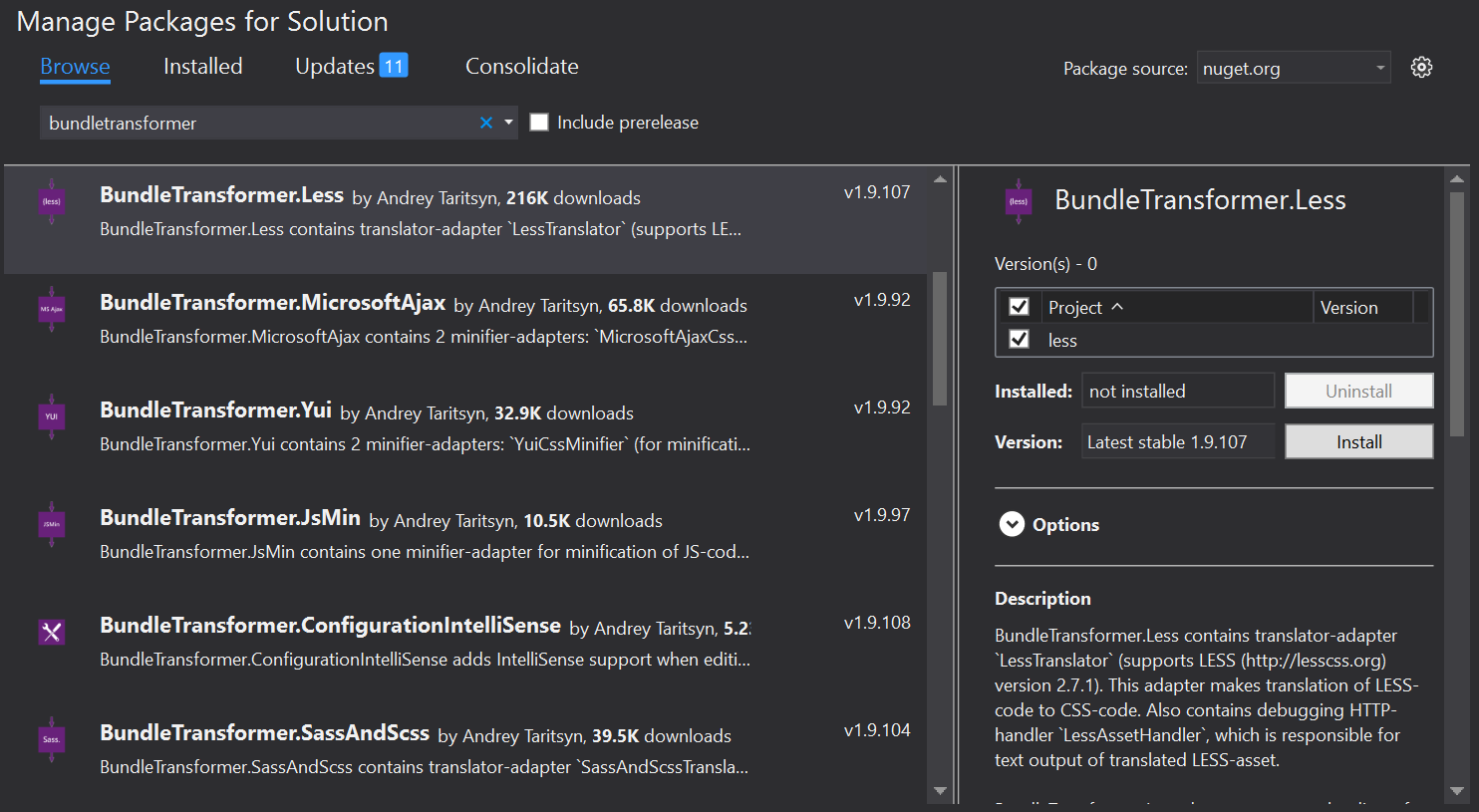
Now I want to try the Bundle Transformer: LESS. Wish me luck.

I can install it from "Manage Nuget Packages for Solution.." in the Nuget Package Manager.


Attempt Compiling LESS into CSS with Visual Studio 2015 via Web Compiler.

So far, I only write CSS for my website presentation. But I heard that VS2015 can compile LESS to CSS and minify it. But I heard wrong. The feature is never in VS2015 but in the previous version that is in the VS2013. That is disappointing.

So I try searching for any extension on the net. Bumped to this in the VisualStudioGallery called Web Compiler. I decided to download and install it.

Then I just have to right-click on the LESS file (in Solution Explorer) and choose compile (right?).


Saturday, May 21, 2016

“An attempt was made to reference a token that does not exist” when sign the assembly

I'm working on a ClickOnce deploy-able project. Since begining of the project and many build and published, no error about this happen. but suddenly this error occur:
Cannot import the following key file: ***.pfx. The key file may be password protected. To correct this, try to import the certificate again or import the certificate manually into the current user’s personal certificate store.

Then I try to reselect the ***.pfx in the "Project Properties->Signing->Choose a name key file". Then This message appear:
“An attempt was made to reference a token that does not exist”
I don't understand why this happen. After searching the net and many attempts for several hours, I finally able to solve it just by running the Visual Studio as Administrator.


I got it from here: Error when using Visual Studio 2010 for assembly signing: “An attempt was made to reference a token that does not exist”

But my solution was not from the chosen as answer but from Josh M.:
Running Visual Studio as Administrator fixed this issue for me.
Problem Solved.


ps: Maybe I should always run the Visual Studio as Administrator. Who knows, I might save several hours of searching.

Conditional Compilation

Today I learn  that I can do Conditional Compiling on VB.Net,

In conditional compilation, particular blocks of code in a program are compiled selectively while others are ignored.

Reference: Conditional Compilation in Visual Basic

For example if I Write this code in the form Load event:
    Private Sub frmStarter_Load(sender As Object, e As EventArgs) Handles Me.Load

#If DEBUG Then
        MsgBox("This is DEBUG build")
#Else
        MsgBox("This is not a DEBUG build")
#End If
    End Sub
When I build in DEBUG mode, the "MsgBox("This is DEBUG build")" and when I build in RELEASE mode or any other custom mode, the "MsgBox("This is not a DEBUG build")" will be triggered.

This is really handy.